The Work Late Accounts feature will send extra communications to your delinquent customers.
- Communications include text and/or email notifications.
- Customers must be manually selected/enrolled in the sequences.
- When a customer is enrolled in a sequence, notifications are sent out on set days (example: customers which are 5 days past due, 10 days past due, 15 days past due, etc.).
- As customers make their payment, they are automatically removed from the sequences.
- You can use our pre-built sequence, or build your own (just let your Customer Success Specialist know).
- Preview the sequences by clicking on “Sequence Library.”
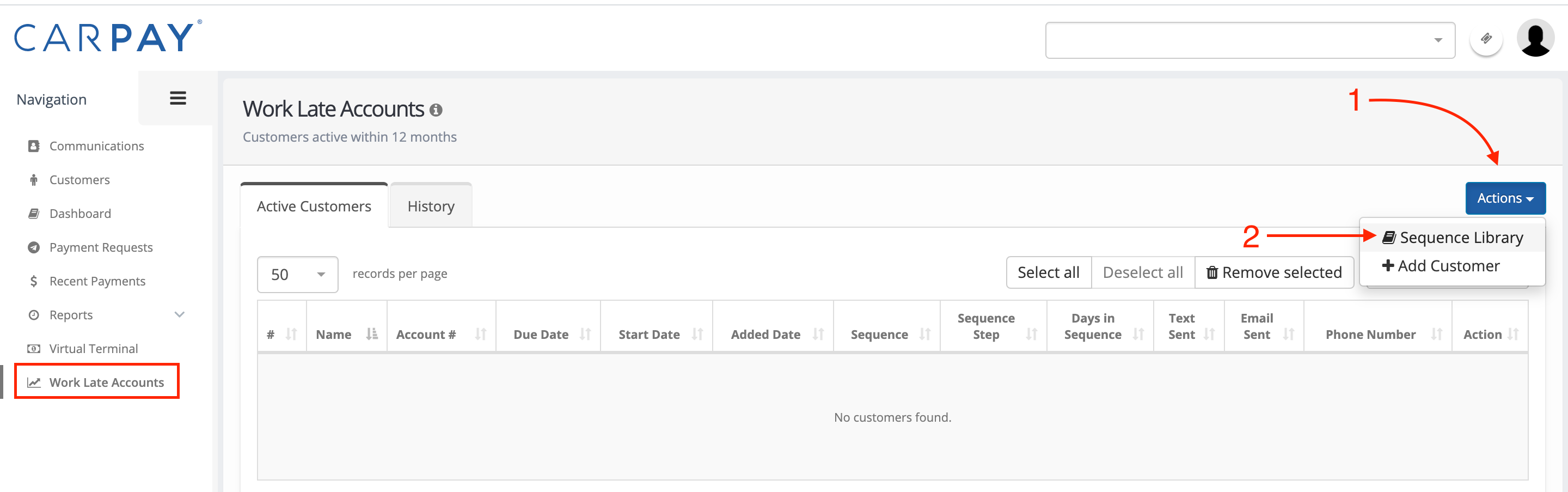
How to enroll customers in Work Late Accounts
1️⃣ Click on Work Late Accounts.
2️⃣ Click on +Add Customer.
3️⃣ Add the customer(s) you want to enroll (you can add more than one at a time).
4️⃣ Select which sequence to enroll the customer(s) in.
5️⃣ Designate the start date.
6️⃣ Click Add.